Welcome. If you are adapting existing OER or creating an OER textbook from scratch, the following information will help you get started. Don't forget to review the Accessibilty information as well.
Sometimes OER authors edit in Word before converting the finished textbook to a PDF. Typically the they will compile a single textbook from multiple OER resources. This requires copying and pasting from a variety of resources and files into a single Word file. If instructors have chosen to create their own textbook, they will need to convert the textbook to a Word file if edits are required. Sometimes an instructor will choose to compile their own textbook. This is an acceptable outcome as long as the instructor is familiar with accessibility guidelines.
OER authors may also edit in Canvas. Formatting a course in Canvas will require more planning, you will usually need to organize the course generally before the OER material is added.
The videos below provide general formatting instructions for both Word and Canvas.
Formatting in Word
Formatting in Canvas
Formatting an OER textbook to be accessible and readable generally requires attention in the following areas:
-
Headings
-
Font size, style, and spacing consistency
-
Special features
-
Lists
-
Images
-
Citations
Using consistent styles in the above areas allows the textbook to be more visually appealing and readable. A consistent style also communicates information to students who can then rely on the structure of the textbook for informational cues. A consistent style also keeps the textbook organized and, therefore, more user-friendly to students as well as easier to edit in the future should the instructor wish to make changes.
Label chapter titles and subsections as headings within Word. Heading 1 should be the largest heading, the title of the textbook. Typically, the next level heading, Heading 2, is the title of a chapter. The subsections of the chapter are Heading 3. If any of those sections have sub-sections, they would be Heading 4, and so on, with the heading levels decreasing as the material continues onto the next chapter, which will again be Heading 2 followed by Heading 3 and so on.
Below is an example of different styles for the headings of a textbook.
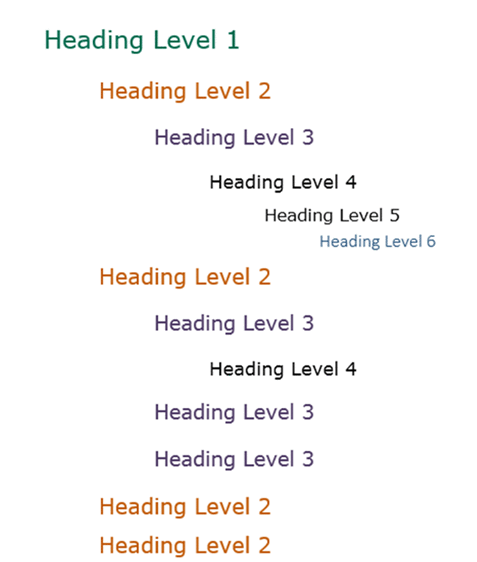
The textbook should have consistent headings so that students can easily understand how the information is organized. Heading 2, for example, should look the same throughout the textbook in style, color, spacing, and font.
For an in depth explanation of using Word styles, refer to chapter 16 of Best Practices in Accessible Online Design, "Using Word Styles" by Heather Caprette.
The body text of the textbook should be a consistent font size and style. Exceptions should be made only to emphasize something, indicate a link, or for some other specific purpose.
OER specialists typically use the following guidelines when formatting the body text of a textbook:
- Calibri as the font
- Font is 12 pt
- Font is black
- Font is not italicized, underlined, or bolded unless something is being emphasized (note: Underlining should be reserved for indicating hyperlinks and should not be used for emphasizing words)
- Words are a single space apart and sentences are also a single space apart
- Paragraphs are single-spaced
- One space between paragraphs
- Avoid using "Normal" style spacing, which adds space automatically but isn't read the same as a space in, for example, Google docs. To make the textbook document more easily transferable between file types, use a space in between paragraphs and not the automatically generated gap that the "Normal" style inserts (usually an 8 pt space).
- Each page has a one-inch margin on all sides
It is strongly recommended that everyone involved in a project agree upon how to address the items noted above before beginning. You might wish to develop an internal style guide
Special features should follow a consistent style and color scheme. Some OER specialists select a palette for special features that is used throughout the textbook and applied to headings as well. Special features are made from tables and can include:
- Tables displaying rows and columns of information
- Single-cell tables displaying call-out boxes, think-about it questions, or other features desired by the instructor
The fonts, styles, and colors used in the special features should be consistent throughout the textbook. Special features should be labelled with a figure number if they are a multi-cell table. Special features that are not a multi-cell table should have a title within the cell. This title should not be formatted as a heading, however, because headings within tables are not recognized by many screen readers.
Below are examples of a table and other special features.
Jump to the Accessibility section on Formatting Tables for further details.
All lists, both numbered and bulleted, should be designated as lists within Word. Numbered lists should not be numbers simply typed out and spaced manually but should be automatically generated with Word's numbering tool so that screen readers can accurately convey the list information to students.
Numbered lists should be in the same font and size as the body text.
Bulleted lists should have the same type of bullets used throughout. Bullets should be the same size. Sometimes when information is copied from another source, the bullets are different sizes from those automatically generated in Word. This is easy to remedy, as selecting the bullet allows its size to be changed just as the text's size can be changed.
The indentation of bullets and numbered lists should be consistent throughout the textbook as well.
Images should be in-line with the text. This means that text does not wrap around the image. Wrapping text around an image is not accessible.
Images should have alternative text (usually referred to as alt text), which can be accessed by right-clicking on the image.
Images can be aligned left, right, or center. This is a design preference and can be modified.
Images should list figure numbers for each image. This allows instructors and the text to reference specific images easily. A footnote associated with the figure number also allows for a clear and organized system for citation.
Below is an example of an image with a figure number, brief caption, and a footnote associated with a citation.
Citations should be in the same font, style, and order. Some OER specialists cite openly licensed materials in this format:
Title of Text by Author is licensed under license
The underlined words are typically links. If no link is available to the content, list the title of the content and do not underline it.
Examples of citations include:
- Image by College of the Canyons ZTC Team. is licensed under CC BY 4.0.
- Image by Andrew Seama. on Unsplash.
- Family Partnerships and Culture by the California Department of Education is used with permission
As shown above, some citations will have different language depending on the nature of the source and its license.
Footnotes can help organize citations and can be accessed in the "References" tab in Word.
Once the textbook has been formatted, read through it to catch typos, formatting inconsistencies, and grammatical errors. It is helpful to have someone who did not format the textbook or educational materials read through the text. Having a fresh eye is really helpful!
Ask anyone who is reviewing the text to use the "track-changes" and "comment" features in Word so that changes can be readily seen and also reversed, should any changes severely impact the document's formatting.
The following resources provide additional guides for creating openly licensed teaching materials.
-
Open Learn offers a free in-depth tutorial on understanding and creating OERs.
-
COERLL Guidelines for Creating and Sharing Open Educational Resources offers a brief, big-picture overview of the OER creation process.
-
BC Campus has created a Self Publishing Guide a reference for individual educators or institutions wanting to write and self-publish an open textbook. This guide provides details on the preparation, planning, writing, publication, and maintenance of an open textbook.
-
Pressbooks is an OER publishing tool. Pressbooks software helps educators and authors create aesthetic, properly formatted, texts for a one-time publishing fee.
-
The OER Student Advocate Toolkit was created by OER student leaders in the California Community Colleges and the California State University. The toolkit's purpose is to motivate students to get involved in OER advocacy and the Open Education movement. The Michelson 20MM Foundation provided funding and support for this project.
-
The College of the Canyons Open Educational Resource (OER) / Zero Textbook Cost (ZTC) Style Guidecontains information on branding and creating OER, including: