SSO Password Update
If you have received notice to change or update your @gcccd.edu SSO password, please follow the instructions below.
When May I Update My Password?
These instructions may be followed while you still have access to your email.
If your password has fully expired, or you are locked out of your account:
- Users that have already set up multi-factor authentication may use the Microsoft Password Reset tool.
- Everyone else must contact your campus or District Help Desk for assistance.
*Note: Changing your password will update it for your email, Self-Service, Canvas, Workday, printing/duplicating, campus computers, Library access, and Wi-Fi on campus.
Updating @gcccd.edu SSO Password
The procedures differ slightly depending upon your location.
Off-Campus Password Update
You can update your expiring password using Outlook on the web. To do so, please:
- Sign in to or open up your GCCCD email on the web.
- Once signed in, look for a circle with your initials or avatar in the upper right-hand corner.
- Click or tap on the circle and a drop-down menu will appear.
- Choose View account:
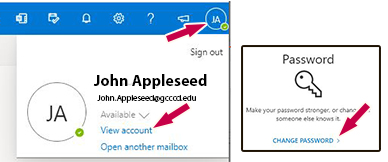
- If you're in the legacy view, locate a tile with a key icon, titled Password. Choose change password to update your password.
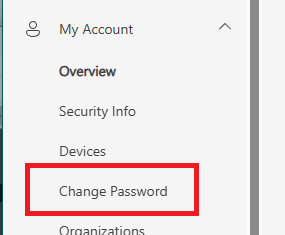
- Alternatively, on the new version of the account homepage, look for the Change Password entry on the left-hand navigation menu:
- Create a new password and write it down in a safe place. Please note the following password requirements. New passwords:
- must be at least 16 characters long
- cannot be too similar to the past 10 passwords used
- cannot contain your name or username
- If your new password is accepted you will receive a notification.
- Verify that the new password is working. Sign out of Outlook and then sign back in with the new password.
On-Campus Password Update
When on campus, you may update your password from any PC on our network. This includes office PCs, computer labs, and classroom instructor stations.
To update your password:
- Log in to any campus PC using your email credentials.
- Once logged in, press CTRL+ALT+DEL.
- Choose Change a password.
- Enter your current email password in the Old password field.
- Create a new password and write it down in a safe place. Please note the following password requirements. New passwords:
- must be at least 16 characters long
- cannot be too similar to the past 10 passwords used
- cannot contain your name or username
- Retype the new password in the Confirm password field.
- You will get a notification message if the change is successful.
Need Further Assistance?
If you have questions or need clarification about this guidance, please reach out to the Technology Help Desk.