Apple ID Update
Learn about changes to Grossmont-managed Apple ID accounts.
Apple ID Migration Complete -- July 2021
The grace period is now over. If you did not manually convert your account, it was assigned a temporary ID by Apple.
You should have received an email to your @gcccd.edu email address. The email contains instructions on how to permanently change over your account. The sender will be [email protected] and the subject line reads "Apple ID Update".
Your temporary Apple-assigned email will be [email protected]. It will use the same password as your previous Apple ID account. As an example: [email protected]
Please log in to Apple ID at appleid.apple.com using your temporary ID above. Follow the guide below (if needed) to change it over to a personal email.
*Note: The information below is deprecated and will not be updated. It is provided for reference only.
Background
We are updating our Apple Device Management System to provide better support and service. This will also provide Single Sign-On capabilities. To do this, Apple requires that we start from a "clean slate". Anyone who has previously used their @gcccd.edu email address for an Apple ID must switch to a non- @gcccd.edu email instead.
Once the update is completed (7/24/21), staff may set up a new Apple ID using their @gcccd.edu email address on District-managed devices. Please follow the instructions below. If you have any questions, please contact the Help Desk.
References
Learn more about Apple's requirements:
- Apple Documentation on Upgrade Requirements
- View a Printable PDF of this guide.
Frequently Asked Questions
Find quick troubleshooting information regarding Grossmont use of Apple IDs below.
What Is an Apple ID?
Your Apple ID is the account you use to access any Apple device (Mac, iPad, iPhone) and make purchases from the App store. Apple IDs are tied to an individual's email and password, used to log in to the account.
How Do I Check My Apple ID?
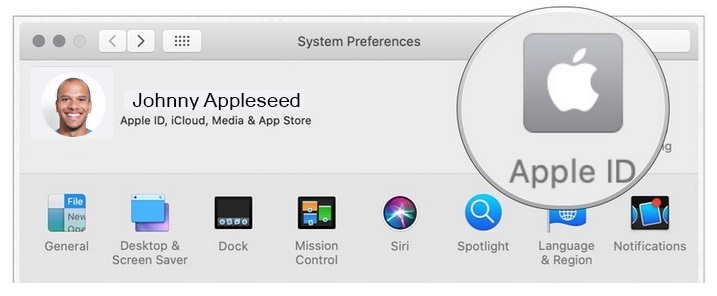
On a Mac computer, check your Apple ID by going to System Preferences and selecting Apple ID:
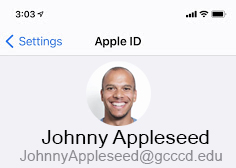
On iPhone or iPad, check your Apple ID by going to Settings and clicking on your profile at the top. The email is listed under your name:
Do I Have to Do Anything?
If - prior to July 2021 - you used your @gcccd.edu email address for your Apple ID, you must change it. If you used a personal email for your Apple ID, you are not affected by this.
What Must I Do?
You will need to change the @gcccd.edu email address associated with your Apple ID to something else. The only change will be the email address tied to your Apple ID. Changing the email address used does not affect any settings, files, or passwords.
Does This Affect Retirees?
This affects all those who used an @gcccd.edu email address as the email for their Apple ID prior to July 2021. If you did so as a retiree, you are affected. However, your @gcccd.edu email and its password will not be affected in any way. The only action required is that the email address used to access your Apple ID be changed to anything other than a @gcccd.edu email address.
Why Is This Change Being Made?
We are implementing a centralized Apple device management system. This will allow us to manage app and settings deployment remotely, en masse, on all Apple devices. This is also necessary in our efforts to unify campus usernames/passwords (so they are linked across applications). This is known as single sign-on.
To accomplish these goals, all @gcccd.edu Apple IDs must be reclaimed. They may then be enrolled in the new system and be managed by the District going forward.
Will This Damage My Account or Change How I Use My Device / Email / Computer?
In short, no.
This will not affect your @gcccd.edu email account or password. This will not change the way you check your email. This will not change how you access your computer. And this will not change or delete any apps, photos, settings, etc., on any of your devices.
What Email Should I Switch To? What If I Don't Have Another Email Address?
You can use any non @gcccd.edu email account. Gmail is a very popular free email account. You may follow this create a Gmail account walkthrough if you need assistance setting one up.
How to Update Your Apple ID
This guide will walk you through changing the email that is associated with your Apple ID. If you need to create a new email address please see the FAQs above.
*Note: The Help Desk is unable to assist with this process.
*Note: We do not have access to your Apple ID, its password, or security information. If you have issues logging in please click the Forgot Apple ID link under the Apple ID login box. You may also utilize Apple's login support or Apple's Two-Factor Authentication support .
These procedures have been adapted from Apple's official instructions: Apple Documentation on Updating your Apple ID email .
To update your Apple ID, please complete the following:
- Please log in to your Apple ID at appleid.apple.com. Sign in using your current @gcccd.edu Apple ID email and Apple ID password.
*Note: This is the password that you set up when you first created the Apple ID. It is not your GCCCD network password. If you are unable to log in please see the support links at the top of this section.
- Click on Edit in the Account Information box:

- Click on Change Apple ID... and enter your personal (non- @gcccd.edu) email that you would like to use for the account:
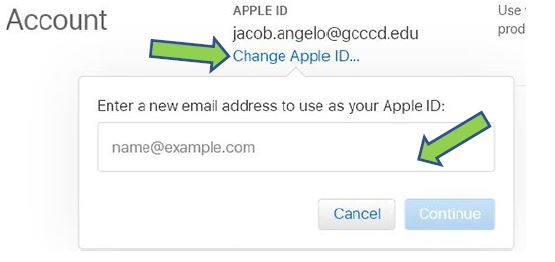
*Note: If you need to create a new email account, please see the FAQs above.
- You will be sent a verification code to the new email account you entered. Check the inbox for that account, then enter the code and select Continue:
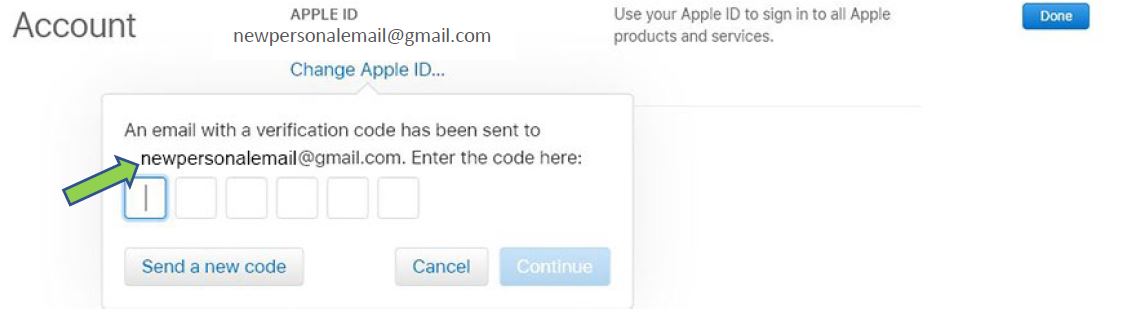
- You should receive a message that you have successfully changed your email address. Click Done to close the window. You will now use this new email as your Apple ID when signing in to Apple devices.
*Note: Your devices may require you to sign-in again once this process is complete.
Need Further Assistance?
If you have questions or need clarification about this guidance, please reach out to the Technology Help Desk.