SPSS Software Setup Guide
Certain Anthropology, Sociology, and other courses require the use of IBM SPSS Statistics software. If you're enrolled in one of these courses, read below to learn how to install and license the software.
*Note: You must uninstall any previous version of the software before following these directions.
Obtaining SPSS can be accomplished in four parts:
Part One - Find Your License
License codes are sent to your Grossmont Student email inbox. They are not sent through Canvas, nor to your personal email address.
*Note: Log in to GCCCD's Outlook instance here: Sign in to Outlook . Use your @gcccd.edu SSO credentials (same as Self-Service and Canvas).
You must be registered in a designated course to receive a license code. Codes are sent around 9:00 am every morning. This can take up to 24 hours after registration to process. Please note, waitlisted students are not yet registered. License codes, once issued, are good for the year.
If you receive a code in the Spring, you will not receive another code in Summer or Fall.
*Note: If you registered for a "2nd 8-weeks" course, your code was probably sent at the beginning of the semester (most likely January or August).
Part Two - Obtain SPSS
You will need to access your student email as described above.
Look for a message from Grossmont Technology. The subject line will read something similar to: IBM SPSS vXX Software installation.
In the message you will find a link to the installer. Choose the proper file for you, depending on whether you're running Windows or Mac.
*Note: SPSS is not available on Chromebooks, Tablets, or Linux.
Part Three - Download and Run the Installer
With the license code saved, the next step is to obtain and run the installer:
- Ensure you're using Chrome, Firefox, or the Edge browser. Copy and open the download link from the email.
*Note: If you receive a security warning, please proceed. The student FTP and installer files are safe.
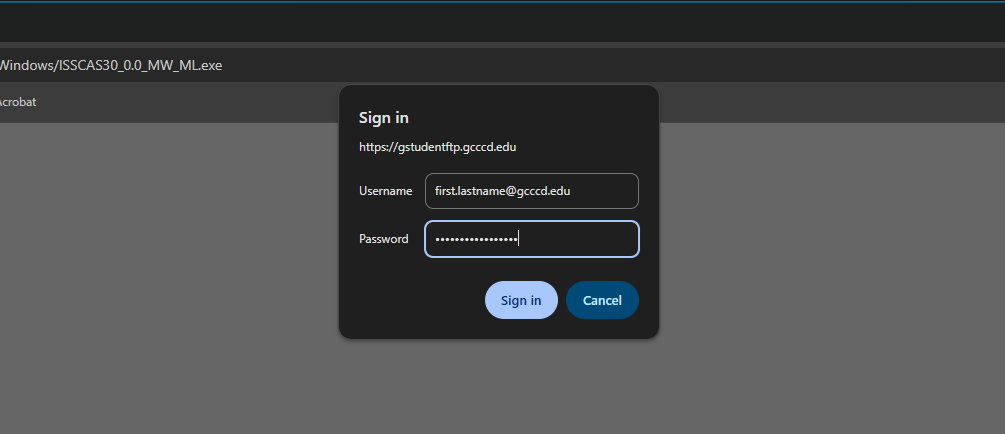
- If you are prompted for a username and password, enter your @gcccd.edu SSO credentials (same as Self-Service and Canvas). If you receive an error message, verify you may access Self-Service in a new window, and that your password is 16 characters or more:
- After the file has downloaded, locate and run it on your computer.
*Note: You must run the installer as an Administrator. It will not install correctly as a normal or "Guest" user.
- Proceed through the wizard to install SPSS as you would any other app. If prompted, enter your computer password (Mac) or allow changes (Windows).
Part Four - Activate Your License
You need to use the license code provided in your student email to activate SPSS. Please complete the following procedures:
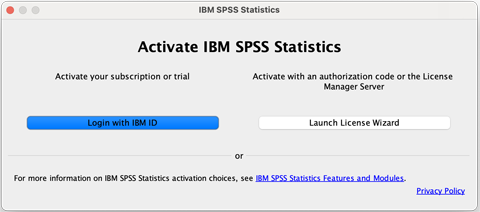
- When you start SPSS, at the Activate IBM SPSS Statistics screen, choose Launch License Wizard:
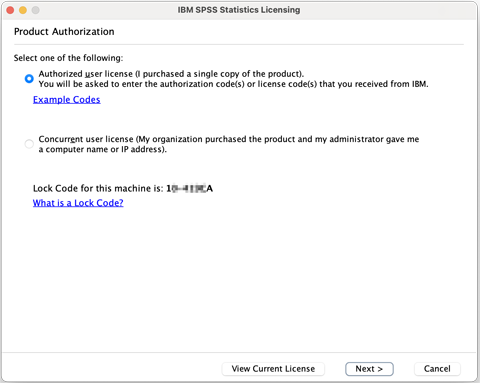
- On the Product Authorization screen, choose Authorized user license (default choice):
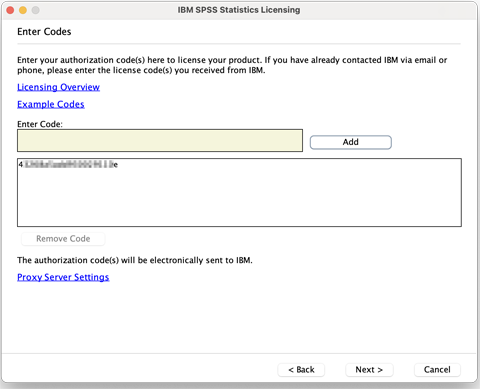
- On the Enter Codes screen, paste the license code from your email and click Add:
- Click Next to reach the Internet Authorization Status screen. Wait for the status to update; this may take 2–3 minutes:
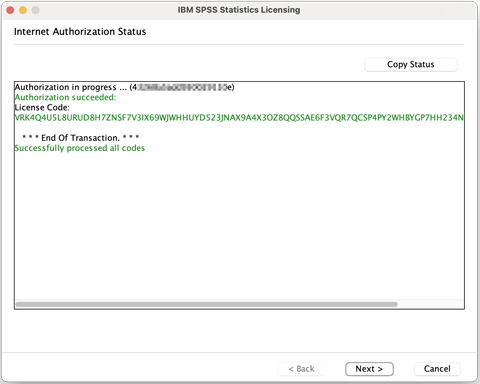
- Once you receive the success message, the process is complete.
Troubleshooting
If you're not able to access your email or the license key isn't working, contact your campus Help Desk.
If you cannot install or license the software, ensure your account has Administrator privileges. Your user account must be an administrator on the computer where you're attempting to install and license the software.
If you're unable to run the software, check for compatibility issues. Read more online about SPSS compatibility for Windows and Mac .
Need Further Assistance?
If you have questions or need clarification about this guidance, please reach out to the Technology Help Desk.